
What should happen automatically—and who approves it?
An AI tool reads your supplier invoice, identifies the amount, and suggests an accounting category.
Everything looks complete.
But does the invoice cover this month or the whole year? Has the purchase already been recorded? Does the suggested category reflect what your business actually bought?
Those questions explain why useful bookkeeping automation is about more than reading documents.
AI in bookkeeping can help extract invoice data, suggest transaction categories, and identify potential matches. The capabilities depend on the software: document-processing tools prepare invoice information, while accounting platforms such as QuickBooks also provide AI-assisted transaction suggestions.
The practical question is not simply, “Can AI do this?”
It is: “What should happen automatically, what should remain a suggestion, and who approves the result?”
This guide gives you a framework for answering those questions without turning every invoice into another manual data-entry task.
What Is AI Bookkeeping?
AI bookkeeping is the use of artificial intelligence to support tasks involved in preparing, organizing, and reviewing financial records.
Different tools address different parts of that work. For example, QuickBooks can suggest how to categorize bank transactions, while Dext AI Assist can suggest or apply changes to document fields based on configured guidance and previous decisions. These are distinct capabilities—not one universal “AI bookkeeper.”
Dext — AI Assist suggestions, explanations, and manual or automatic actions
Intuit — category suggestions, matching, and records still arriving
It also helps to distinguish AI from ordinary automation.
A fixed instruction such as “use this default account for this supplier” is a rule. A system that interprets the document and proposes a category is making a prediction. Both can be useful, and products may combine them. Dext’s documentation, for example, distinguishes rules, AI suggestions, and automatic publishing within its workflow.
Dext — rules, review, and automatic publishing
For your business, the label matters less than the behavior.
Can you see what the system changed? Can you correct it? Can you stop an uncertain transaction from reaching the books?
A Practical Framework: Automate, Assist, Review
Use the following as a recommended starting model—not a claim that every product includes these features or that every transaction requires the same controls.
| Task | Recommended role for automation | What a person should establish |
|---|---|---|
| Extracting invoice and receipt details | Automate preparation. Present the values for review. | Which fields are required and whether the source supports them. |
| Checking missing information or possible duplicates | Automate the warning. | Whether the issue is real and how to resolve it. |
| Suggesting categories or transaction matches | Assist the decision. | Whether the suggestion fits the purchase and existing records. |
| Drafting client questions or review summaries | Assist the writing. | Whether every statement is supported and appropriate to share. |
| Deciding accounting treatment for unfamiliar transactions | Keep responsible review. | The business context, accounting policy, and applicable requirements. |
| Approving posting, payments, or period-end completion | Apply defined authorization controls. | Who has authority and what evidence they must check. |
This approach does not require choosing between “everything manual” and “everything automatic.”
Start by automating preparation. Expand the actions you permit only after testing how the workflow handles both ordinary documents and exceptions.
Less typing should not mean less visibility.
Read the document, organize fields, and surface repeatable checks.
Prepared informationSuggest categories, possible matches, and drafts grounded in verified facts.
Suggestions to assessResolve context, accounting treatment, and the authority to take the next action.
An explained decisionWhat You Can Automate in Bookkeeping
Reading Invoices and Receipts
Document capture is a practical place to start because the information already exists on the source.
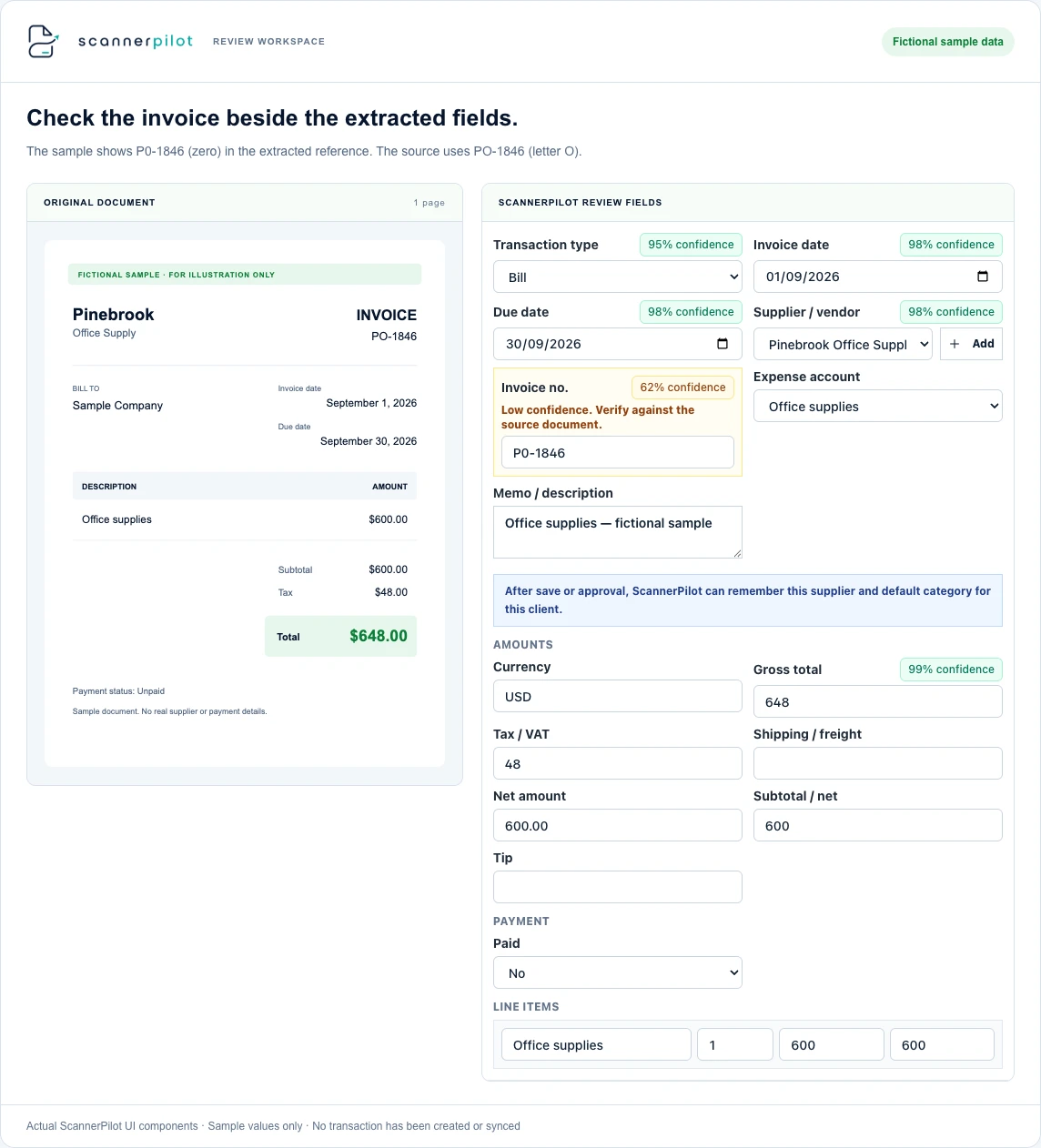
ScannerPilot’s invoice-capture workflow extracts supplier details, invoice numbers, dates, tax, totals, and line items from PDFs and images. The extracted information is presented for review before approval.
ScannerPilot — receipt and invoice capture
That changes the reviewer’s starting point.
Instead of opening a blank form and copying every value, the reviewer compares prepared fields with the document.
For your first test, choose familiar supplier invoices and identify the fields that matter most. Record where corrections are needed rather than judging the tool only by whether it finishes extraction.
Automate the first pass. Verify the values that determine the entry.
For how documents become prepared fields, read our guide to invoice OCR.
Running Repeatable Checks
Ask your workflow to surface missing information, inconsistent values, and possible repeat submissions.
Some checks can be rules-based. Others may use document comparisons or model predictions. Do not assume that every warning is an AI judgment—or that a warning is automatically correct.
For example, ScannerPilot documents duplicate comparisons using the vendor, invoice number, invoice date, total, and file checksum. These signals flag possible repeats before QuickBooks transactions are created.
Your operating rule should be clear: a warning creates a review task.
Do not let “possible duplicate” silently become “delete this document,” especially before you have tested legitimate recurring invoices with similar amounts.
Our duplicate invoice detection guide shows how to separate repeat submissions from valid similar invoices.
Transferring Approved Information
Once the information has been checked, there is little value in making someone type the same details into another screen.
ScannerPilot supports syncing approved Bills or Expenses to QuickBooks Online with the source document attached. Its feature documentation also separates attachment status from transaction creation and supports attachment retries.
Define completion accordingly.
Check the accounting record and its supporting file. A successful upload is not the same as a completed transaction, and a missing attachment is not automatically a reason to create another Bill.
Compare values, investigate exceptions, and establish the accounting decision.
Original document, agreements, policy, existing records, and payment history.
Evidence feeds the reviewWhere AI Should Assist Rather Than Decide
Expense Categorization
A suggested category can be a useful starting point.
QuickBooks documents using previous vendor and category information to categorize familiar expenses. It also distinguishes less familiar or highly contextual transactions, including loans, owner’s draws, and transfers, from the expenses it will automatically categorize through that feature.
Intuit — familiar-expense categorization and its exclusions
For your own review process, pay attention when the purchase changes even though the supplier does not.
Suppose a business normally buys monthly technical support from a vendor. This month, the same vendor supplies equipment.
The supplier history is relevant, but it is not the whole decision.
Ask whether the suggested account reflects this purchase, not merely the last transaction from the same business.
Matching Transactions Already in the Books
AI can also help find a possible relationship between a bank transaction and an existing accounting record.
QuickBooks uses transaction details and history to suggest matches, including potential partial or combined matches. Intuit also explains that a matching record may still be arriving from another application, which can be a reason to pause rather than immediately create a new entry. Feature availability depends on the account and plan.
Intuit — category suggestions, matching, and records still arriving
Use the suggestion to shorten the search—not to skip the investigation.
Check the amount, date, transaction type, and record being matched. A familiar amount alone should not settle the decision.
Drafting Client Questions and Review Notes
A useful way to test a generative AI assistant is to ask it to improve a message based on information you have already verified.
For example:
This is a suggested prompt, not a ScannerPilot feature.
Before sending the result, compare it with the approved list. A professional tone does not establish that the contents are accurate. ICAEW’s guidance advises reviewing and challenging generative AI outputs, particularly when they concern accounting, tax, or jurisdiction-specific requirements.
ICAEW — reviewing generative AI outputs in context
Highlighting Items for Month-End Review
Some accounting platforms can help identify issues worth investigating.
Intuit describes Accounting AI analysis of certain Balance Sheet and Profit and Loss accounts as a supplemental review. Its documentation identifies potential issues such as miscategorization and duplicate transactions while noting that coverage does not include every account.
Intuit — Accounting AI and supplemental report review
That wording matters.
A suggested issue is not a completed correction. Equally, the absence of a warning is not proof that the books are complete.
Use the output to guide attention, then verify the underlying records.
What Still Needs Human Review?
Business Purpose and Missing Context
A receipt can show what was purchased without explaining why the business purchased it.
Make sure the reviewer can obtain the context needed to reach a decision. That might mean checking a contract, asking the employee who submitted the document, or confirming which client or project received the service.
For unfamiliar or mixed-purpose transactions, do not treat a plausible category as sufficient evidence.
ICAEW’s guidance for accountants emphasizes reviewing AI suggestions in the context of the client’s circumstances rather than accepting them at face value.
ICAEW — professional judgment and accountability when using AI in tax work
Accounting Periods and Tax Treatment
A correctly extracted invoice date does not, by itself, determine the full accounting treatment.
Ask the responsible reviewer to check the service period, the nature of the purchase, the business’s accounting policies, and any relevant tax requirements.
Do not use a general AI explanation as a substitute for verifying the rules that apply to the business. ICAEW specifically cautions that accounting and tax outputs can be jurisdiction-specific without making that distinction clear.
ICAEW — reviewing generative AI outputs in context
This is a workflow guide, not transaction-specific accounting or tax advice. Unfamiliar treatment should be checked with the person responsible for your accounts.
Existing Bills and Payment Records
Before creating a purchase transaction, determine whether the obligation is already recorded.
QuickBooks distinguishes a Bill for a purchase payable later from an Expense or Check for a purchase paid immediately. When an existing Bill is being paid, Intuit directs users to the bill-payment workflow rather than creating a separate Expense or Check that leaves the Bill outstanding.
Intuit — differences between Bills, Checks, and Expenses
Build that distinction into the review.
An invoice, a payment receipt, and a bank download may concern the same purchase. Their arrival through different channels is not a reason to record the purchase repeatedly.
Approval and Accountability
Define who is responsible for accepting the result.
That includes deciding which actions can run automatically, which require approval, and what must happen when information is incomplete.
For professional accountants, responsibility does not disappear because a tool produced the recommendation. ICAEW’s AI guidance places accountability and professional judgment with the accountant.
In practical terms, a useful approval should leave someone able to explain the decision—not merely confirm that the software suggested it.
Record the missing information or decision. Assign an owner and ask for the evidence needed.
Return to review when clarifiedRetain the decision and its reason. Carry out the approved step, then verify its result.
Check the resulting record and fileWhy a High AI Confidence Score Is Not Accounting Approval
A confidence score describes a model’s estimated certainty about a prediction.
Microsoft’s document-processing guidance distinguishes confidence in extracted results from measured model accuracy and recommends human validation for critical workflows. It also notes that document variations can affect performance.
Microsoft — document extraction confidence, accuracy, and human validation
Consider the difference between these statements:
“The document says $1,500.”
“This is the correct amount to record in this account for this period.”
The first is an extraction question. The second requires additional context.
A high-confidence reading does not establish that the purchase is authorized, the category is appropriate, or the invoice is new.
Use confidence to prioritize review, not to replace the approval policy.
How certain is the model that it read the source correctly?
- Which account and period?
- Is the purchase authorized?
- Has it already been recorded?
Worked Example: The Invoice Is Read Correctly, but the Entry Still Needs Review
The following example is fictional. It illustrates an accounting-review decision, not measured performance from ScannerPilot or another product.
A business receives an invoice from CedarCloud Systems showing:
| Invoice detail | Information on the document |
|---|---|
| Software access | $1,200 for a twelve-month period |
| Onboarding service | $300 |
| Combined charges | $1,500 before any applicable tax |
| Supplier history | Previous purchases were monthly software subscriptions |
Suppose an AI-assisted workflow reads every amount and reference correctly. Based on the previous transactions, it suggests placing the entire purchase in the usual software-subscription account.
The extraction is accurate. The proposed treatment still needs attention.
The reviewer checks the agreement, confirms the service period, and separates the questions concerning the subscription and onboarding service. The responsible accountant then determines the treatment under the business’s policies and applicable requirements.
Only after those decisions are clear does the reviewer approve the record.
Nothing had to be misread for the recommendation to need review.
AI prepared the information. The reviewer established what that information meant for the books.
Previous purchases were monthly subscriptions. This purchase needs its own context.
- 01Confirm the service period
Check the agreement covering the twelve-month software access.
- 02Separate the review questions
Understand the software access and the onboarding service before accepting a category.
- 03Establish the accounting treatment
The responsible accountant applies the business’s policies and relevant requirements.
Protect Client Information Before Using AI Tools
Evaluate data handling before uploading real client or business documents.
ICAEW’s current confidentiality guidance advises firms to understand where information is stored, who can access it, whether it may be used to train models, and how outputs are monitored. It also emphasizes limiting internal access to people who need the information for a legitimate purpose.
ICAEW — protecting client confidentiality when using AI
Turn those considerations into purchasing questions.
Ask about retention, deletion, model-training use, access controls, and the separation of client workspaces. Confirm the terms for the specific product and subscription—not just the provider’s general marketing page.
For early tests, use fictional or properly redacted documents unless the tool has been approved for the information involved.
Do not assume that a product is suitable for confidential records simply because it describes itself as “AI-powered,” “enterprise,” or “built for accountants.”
Check the data policy as carefully as the feature list.
Where ScannerPilot Fits in an AI Bookkeeping Workflow
ScannerPilot focuses on the document preparation that happens before supplier records reach QuickBooks Online.
Its published workflow combines document upload, extraction, source-and-field review, duplicate warnings, and approval before sync. Separate client workspaces help organize the documents and their accounting destinations.
That makes its role specific:
Prepare the supplier document → Review the information → Approve the record → Verify it in QuickBooks
This is different from claiming that the product makes every accounting decision or replaces your entire finance process.
Keep broader requirements separate. Payroll, tax filings, payment authorization, and final accounting decisions should each have an identified system and responsible person.
The useful test is whether ScannerPilot improves the document work your team performs—not whether it can be described as a fully autonomous bookkeeper.
Follow the full document lifecycle in our guide to automated invoice processing.
Choosing AI Bookkeeping Software: Compare the Controls
Do not choose a tool solely because it uses AI. Compare the work it performs and the decisions it lets you control.
QuickBooks already offers receipt capture, extracted-data review, and options to create or match transactions. Testing your existing account is therefore a reasonable first step before adding another application.
Intuit — receipt capture, extracted-data review, and matching
Dext AI Assist offers another operating model: users can accept, dismiss, or automate suggestions, with guidance controlling actions such as field updates and publishing. Review controls are not unique to ScannerPilot.
Dext — AI Assist suggestions, explanations, and manual or automatic actions
During evaluation, ask the same questions of each workflow:
Can I inspect the evidence? Look for the original document, the proposed value, and any explanation supporting the suggestion.
Can I control the action? Establish what can happen automatically and what requires approval.
Can I resolve a mistake? Check how corrections, rejected suggestions, and incomplete records are handled.
Choose based on demonstrated fit with your process, not an unsupported accuracy percentage or a long list of features you will not use.
How to Start Using AI in Bookkeeping Without Changing Everything
Start with One Repetitive Task
Choose a narrow starting point, such as preparing supplier invoices for review.
Avoid introducing document extraction, automatic categorization, automatic posting, and new approval rules simultaneously. A smaller pilot makes it easier to identify what improved and what caused problems.
Define the Review Policy First
Write down who checks the documents and what prevents an item from proceeding.
Examples might include an unclear total, an unfamiliar purchase, a suspected duplicate, or a missing accounting decision. These are suggested controls; adapt them to the risk and complexity of your business.
Make sure an unresolved item has an owner and a next action.
Test Normal Documents and Exceptions
Use a representative sample, not only clean invoices from one supplier.
Include the types of PDFs, receipt photos, itemized invoices, and unusual documents your team normally receives. Microsoft’s document-processing guidance notes that variation between document formats affects extraction performance, which is why a narrow sample can give an incomplete picture.
Microsoft — document extraction confidence, accuracy, and human validation
Use a controlled process so testing does not create unwanted records in live books.
Measure the Work That Remains
For the pilot, track hands-on review time, important corrections, missed exceptions, and whether the final records include their supporting files.
Keep setup time separate from recurring work.
A useful measure is:
Define “completed” before calculating it. For this workflow, that should mean the intended record and attachment have been verified—not merely uploaded.
Treat the pilot as evidence about your process, not a universal performance benchmark.
Frequently Asked Questions
Can AI do all my bookkeeping automatically?
Some products can automate substantial parts of preparation and posting under configured conditions. That does not establish that every transaction is appropriate for unattended handling. Dext’s documentation, for example, distinguishes manually reviewed suggestions from automatic actions governed by user guidance.
Define the decisions your business needs before choosing how much automation to enable.
Does using AI mean I no longer need a bookkeeper?
Automating a task is different from assigning responsibility for the books.
Someone still needs to establish the process, resolve unfamiliar situations, and verify the outcome. ICAEW’s guidance makes clear that professional accountability remains with the accountant when AI supports the work.
The staffing decision should follow your actual workload and complexity—not the presence of an AI feature.
Does QuickBooks Online already use AI?
Yes. QuickBooks documents AI-assisted category and transaction-match suggestions. Its “Ready to post” feature also identifies qualifying transactions for batch review and posting, with availability depending on the subscription, country, and interface.
Check your account before assuming you need another application.
Can AI bookkeeping software guarantee complete accuracy?
Do not treat a prediction or confidence score as a guarantee. Microsoft distinguishes estimated confidence from model accuracy and explains that results can change with document variation. Test representative records and maintain controls for consequential errors.
Is it safe to upload client invoices into an AI tool?
That depends on the tool’s data handling, your permissions, and the obligations covering those records.
Review storage, access, retention, and model-training policies before uploading confidential information. ICAEW’s guidance explicitly calls for understanding these controls rather than assuming technology reduces confidentiality responsibilities.
Let AI Prepare the Work. Keep the Important Decisions Visible.
The strongest starting point for AI bookkeeping is a clearly defined task.
Let the software prepare invoice information, surface exceptions, and reduce repeated entry. Give reviewers the source documents and context they need to decide what reaches the books.
ScannerPilot supports that approach through document extraction, review, duplicate checks, and approved QuickBooks sync with the original file attached.
Start with one manageable batch. Check what was prepared, what required a decision, and what actually appeared in QuickBooks.
You do not need to choose between doing everything manually and trusting everything automatically. Automate the preparation. Stay responsible for the result.
Published by ScannerPilot. Intuit, Dext, Microsoft, and ICAEW primary documentation was checked on September 20, 2026. Product features vary by subscription, configuration, country, and interface; QuickBooks references describe the U.S. product. ICAEW professional guidance has its own stated membership and jurisdictional scope, including UK tax work for the PCRT source.
- Dext — AI Assist suggestions, explanations, and manual or automatic actions
- Dext — rules, review, and automatic publishing
- Intuit — familiar-expense categorization and its exclusions
- Intuit — category suggestions, matching, and records still arriving
- Intuit — Accounting AI and supplemental report review
- Intuit — Ready to post criteria, review, and availability
- Intuit — differences between Bills, Checks, and Expenses
- Intuit — receipt capture, extracted-data review, and matching
- Microsoft — document extraction confidence, accuracy, and human validation
- ICAEW — reviewing generative AI outputs in context
- ICAEW — professional judgment and accountability when using AI in tax work
- ICAEW — protecting client confidentiality when using AI
- ScannerPilot — receipt and invoice capture
- ScannerPilot — duplicate checks before approved sync
- ScannerPilot — QuickBooks Online workflow
The automate–assist–review framework and pilot measures are recommendations, not universal controls or product benchmarks. CedarCloud Systems and its $1,500 example are fictional; no accounting treatment or tax amount is prescribed. The Pinebrook screenshot captures real interface components with sample values and confidence scores, not a live product test. The example writing prompt is for a general AI assistant, not a ScannerPilot feature.